hdfs使用方法

HDFS使用方法

一、使用命令操作HDFS

查看文件、发送文件

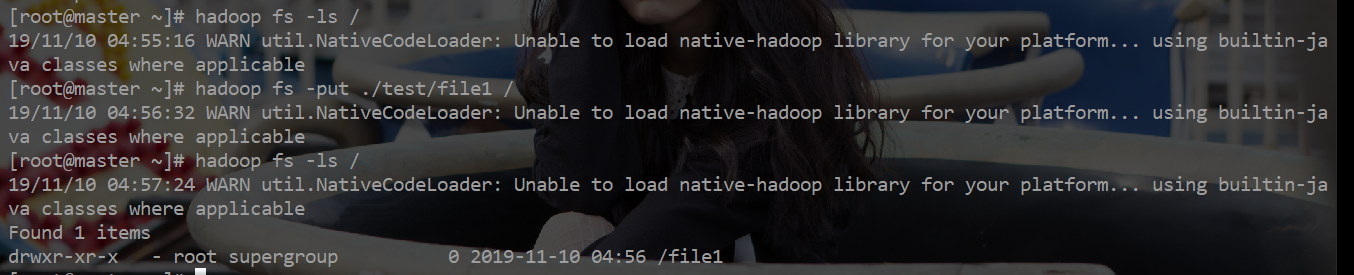
hadoop fs -ls / 查看hdfs根目录文件

hadoop fs -put ./test/file1 / 将test目录下的file1发送到hdfs根目录
创建目录

hadoop fs -mkdir -p /test/user/ -p为递归创建,可以创建多级目录

下载文件、删除文件

hadoop fs -get sourcepath savepath

将hdfs test 文件夹下的user文件夹 下载到本地的test文件夹下

hadoop fs -rm -r /test/user/del

删除 test/user 下的del文件,-r循环删除文件夹下的所有文件

查找文件

hadoop fs -find / -name xxx 从根目录开始查找名为xxx的文件位置

二、使用Java接口操作HDFS

添加环境变量

1
2
3
修改 .bashrc,添加
export HADOOP_CLASSPATH=$JAVA_HOME/lib/tools.jar
source .bashrc

编写Java代码

实现 put 、 delete、get三个方法

参考老师的PPT

代码如下:

1
2
3
4
5
6
7
8
9
10
11
12
13
14
15
16
17
18
19
20
21
22
23
24
25
26
27
28
29
30
31
32
33
34
35
36
37
38
39
40
41
42
43
44
45
46
47
48
49
50
51
52
53
54
55
56
57
58
59
60
61
import java.io.IOException;
import org.apache.hadoop.conf.Configuration;
import org.apache.hadoop.fs.FileSystem;
import org.apache.hadoop.fs.Path;
public class hadoop_try{
public static Boolean put(String src , String dst , Configuration conf){
Path dstPath = new Path(dst) ;
try{
FileSystem hdfs = dstPath.getFileSystem(conf) ;
hdfs.copyFromLocalFile(false, new Path(src), dstPath) ;
}
catch(IOException ie){
ie.printStackTrace() ;
return false ;
}
return true ;
}
public static Boolean get(String src , String dst , Configuration conf){
Path dstPath = new Path(dst) ;
try{
FileSystem dhfs = dstPath.getFileSystem(conf) ;
dhfs.copyToLocalFile(false, new Path(src), dstPath) ;
}
catch(IOException ie){
ie.printStackTrace() ;
return false ;
}
return true ;
}
public static Boolean Delete(final String path , Configuration conf){
Path dstPath = new Path(path) ;
try{
FileSystem dhfs = dstPath.getFileSystem(conf) ;
if(dhfs.exists(dstPath)){
dhfs.delete(dstPath, true) ;
} else{
return false ;
}
}
catch(IOException ie ){
ie.printStackTrace() ;
return false ;
}
return true ;
}
public static void main(String[] args) {
String dst = "hdfs://Master:9000/test/user" ;
String src = "/root/test/tryfile";
Boolean status = false ;
Configuration conf = new Configuration() ;
status = put( src , dst , conf) ;
System.out.println("put status="+status) ;
src = "hdfs://Master:9000/test/user/tryfile";
dst = "/root/" ;
status = get( src , dst , conf) ;
System.out.println("get status="+status) ;
dst = "hdfs://Master:9000/test/user/tryfile";
status = Delete( dst , conf) ;
System.out.println("del status="+status) ;
}
}

编译、打包、运行

1
2
3
编译 :  hadoop com.sun.tools.javac.Main hadoop_try.java
打包 : jar cf hadoop_try.jar hadoop_try*.class
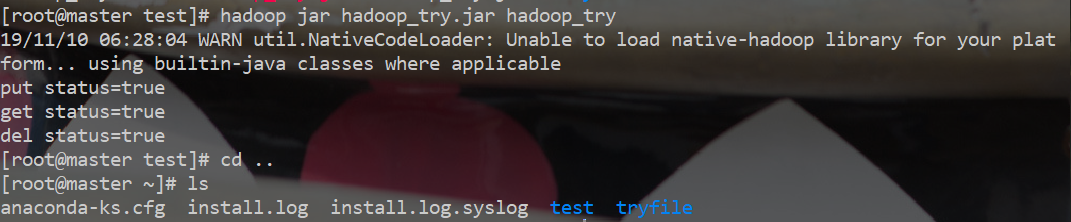
运行 : hadoop jar hadoop_try.jar hadoop_try

通过get方法,将hdfs上 /test/user/tryfile 下载到了 root文件夹下 , 验证: